
A desktop client
for Apache Kafka.
Work with clusters, topics, messages, consumer groups, brokers and partitions from one focused interface. Installs locally — no Docker Compose or web server required.
Built for everyday Kafka workflows
Three use cases. Each with a focused, purpose-built interface.
Topics, brokers, partitions, configurations.
Connect to multiple named clusters and switch between them without restarting. Browse topics with partition count, replication factor, and retention. Compare configurations of two topics side by side to spot differences at a glance.

Live and historical messages, decoded.
Browse live or historical messages with key, value, headers, and metadata. Switch between partition, offset, and timestamp modes. Formats: JSON, Avro (via Schema Registry), String, Hex, and Base64. Field display limited to 64 KiB.

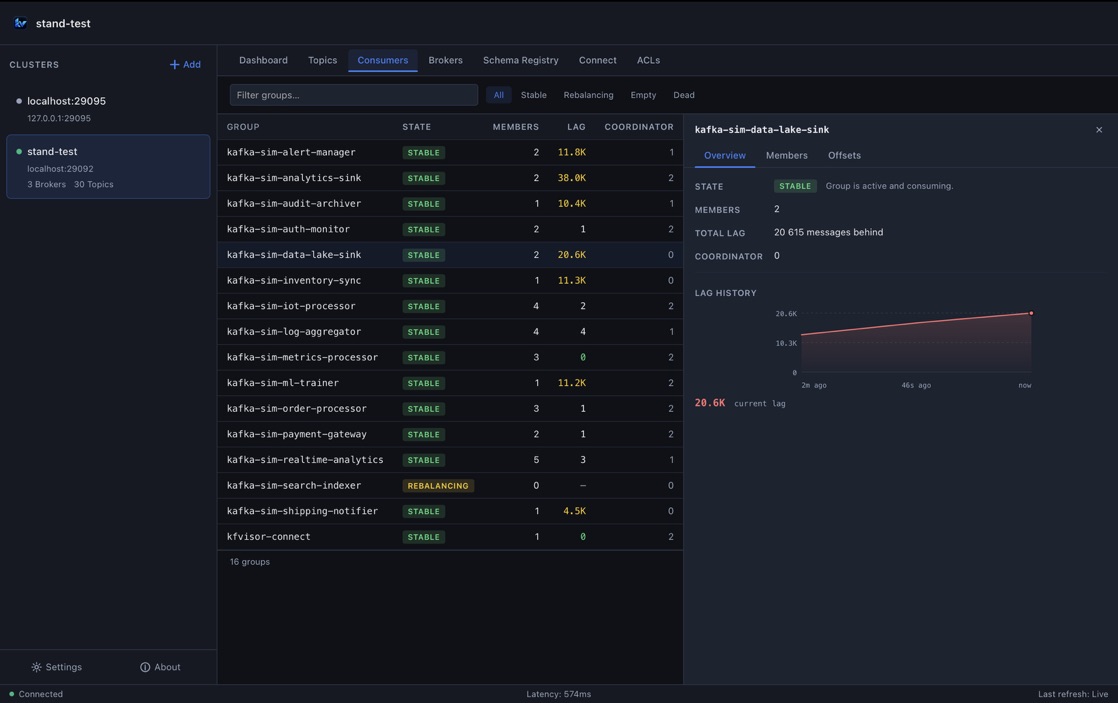
Group status, lag, and per-partition offsets.
See every consumer group with its state, total lag, member count, and coordinator. Drill into per-partition offsets — current, earliest, log-end, and lag. Filter by state: Stable, Rebalancing, Empty, Dead.

Available on macOS, Linux, and Windows.
Native packages for every major platform.
Questions
KfVisor is a native desktop application for Apache Kafka. It runs on your machine, connects directly to your clusters, and gives you a visual interface for topics, messages, consumer groups, brokers, Schema Registry, and Kafka Connect — without a web server, Docker setup, or browser.
KfVisor runs on macOS (Apple Silicon), Linux (x86_64), and Windows (x86_64). Packages are available as DMG, AppImage, DEB, and MSI.
No cluster-side changes are required. KfVisor connects using standard Kafka client protocols. Supported auth: SASL/PLAIN, SCRAM-SHA-256, SCRAM-SHA-512, TLS with custom CA, and mutual TLS (mTLS). The cluster must be reachable from your machine.
Yes. KfVisor decodes Avro messages using a connected Schema Registry and provides read/control access to Kafka Connect. Schema Registry and Kafka Connect are configured separately per cluster profile.
The current release is not yet notarized by Apple. If macOS blocks KfVisor from opening, run this command in Terminal once: xattr -dr com.apple.quarantine /Applications/kfvisor.app — then open the app normally.
KfVisor is currently free in Early Access. No license key is needed to download or run it. When an Early Access offer is active, activation is managed inside the application — not through this website.